Your Shopify store could be missing out on sales opportunities, and you might be unaware. Moreover, as e-commerce competition intensifies in 2025, success isn’t solely reliant on website traffic. Shopify CRO (Conversion Rate Optimization) is the key factor. Each visitor who doesn’t make a purchase equals lost income, and every moment of delay at checkout could mean losing a customer.
The stark truth? Most Shopify stores have conversion rates below 2%. That indicates that 98% of their hard-won traffic leaves without making a purchase. However, imagine reversing that trend. Suppose a thorough Shopify CRO Audit could expose the hidden issues in your sales process and turn your store into a sales powerhouse?
Case Study: 127% Conversion Rate Improvement in 90 Days
A boutique fashion store was struggling despite impressive traffic numbers. With 15,000 monthly visitors and a strong Instagram following, the Shopify store converted at just 0.8%, meaning 99.2% of traffic left without purchasing.
The breakthrough discovery? A single checkout bug was costing $4,200 per month in lost sales.
After fixing this one issue, the conversion rate jumped to 2.1% overnight. As a result, within 60 days, it reached 3.4%, generating an additional $180,000 in revenue that year.
The reality: Most Shopify stores are sitting on conversion goldmines, but owners don’t know where to look.
The key difference? A systematic Shopify CRO Audit process that most “experts” completely miss.
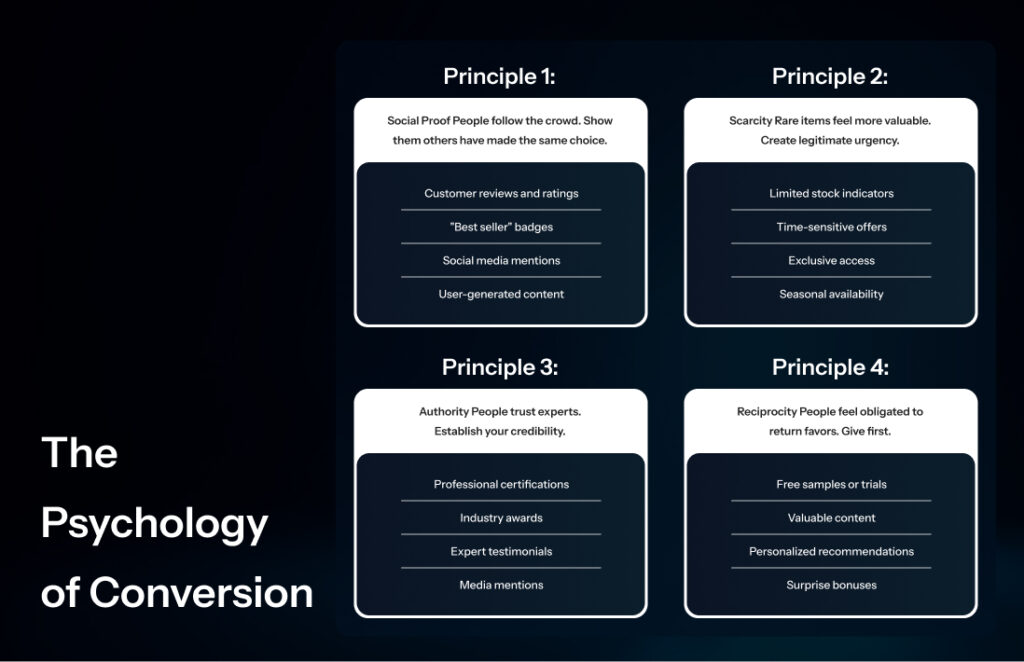
Quick Start: The 5-Step Shopify CRO Audit Framework
Here’s the Shopify CRO Audit framework that actually works:
Step 1: The Revenue Leak Detector
What you’re looking for: Where money disappears from your funnel
Quick Actions:
- Check your Google Analytics → Conversions → Ecommerce → Shopping Behavior
- Identify your biggest drop-off point (usually cart abandonment)
- Screenshot this data. It’s your baseline
Red Flag Indicators:
- Cart abandonment rate above 70%
- Product page exit rate above 60%
- Checkout abandonment above 25%
Step 2: The Mobile Reality Check
The brutal truth: 78% of Shopify traffic is mobile, but most stores optimize for desktop first.
Quick Mobile Test:
- Load your store on your phone
- Try to buy your best-selling product
- Time how long it takes from landing to checkout
- Note every friction point
Instant Fixes:
- CTAs thumb-accessible (bottom 1/3 of screen)
- One-thumb navigation
- Check out can be completed without zooming
Step 3: The Trust Signal Audit
Psychology fact: Trust beats price 73% of the time in purchase decisions.
Trust Elements Checklist:
- Customer reviews are visible on product pages
- Security badges on checkout
- Clear return policy (linked in header/footer)
- Contact information is easily findable
- Professional product photography
Step 4: The Conversion Killer Hunt
Common conversion killers I find in 90% of stores:
Checkout Issues:
- Forced account creation
- Hidden shipping costs
- Too many form fields
- No guest checkout option
- Limited payment methods
Product Page Problems:
- Weak product descriptions
- Missing size/fit information
- No urgency or scarcity
- Unclear pricing
- Poor quality images
Step 5: The Quick Win Implementation
Priority fixes that take under 30 minutes each:
- Add exit-intent pop-up
- Offer a 10% discount for email signup
- Expected result: 15-25% reduction in abandonment
- Enable guest checkout
- Shopify Settings → Checkout → Customer Accounts
- Expected result: 10-15% increase in conversions
- Add trust badges
- Place security badges on the checkout page
- Expected result: 8-12% increase in completed purchases
- Optimize the mobile menu
- Ensure key categories are above the fold
- Expected result: 20-30% improvement in mobile navigation
Great job finishing the 5-step audit and putting those immediate changes into effect!
Consequently, you’re now in a better position than nine out of ten store owners who don’t get past the ‘I really need to improve my site’ thought.
However, this is where the game truly changes. The following 24 hours are very important for putting in place the structured basis that will turn your first changes into ongoing growth. In fact, this isn’t about small improvements; it’s about creating the necessary support to make lasting optimization happen.
Beginner’s Guide: Your First 24 Hours
Hour 1-2: Set Up Your Analytics Foundation
Most store owners look at vanity metrics. Here’s what matters:
Essential Metrics to Track:
- Conversion rate (goal: above 2.5%)
- Average order value (track weekly trends)
- Cart abandonment rate (benchmark: under 70%)
- Page load speed (goal: under 3 seconds)
- Mobile conversion rate (should be 80 %+ of desktop rate)
Free Tools Setup:
- Google Analytics 4 – Enhanced Ecommerce tracking
- Google Search Console – Technical SEO issues
- PageSpeed Insights – Speed optimization
- Shopify Analytics – Platform-specific insights
Hour 3-4: The Heatmap Revolution
Install Hotjar (free plan available) and let it run for 24 hours. You’ll discover:
- Where users actually click (vs. where you think they click)
- How far down the pages do they scroll
- Which elements do they ignore completely
Hour 5-6: Competitor Intelligence
Visit your top 3 competitors and document:
- Their checkout process (how many steps?)
- Trust signals they use
- Pricing presentation
- Mobile experience quality
- Unique features you’re missing
Pro tip: Use incognito mode and complete a purchase to understand their full customer experience.
Hours 7-8: The Friction Point Mapping
Create a simple spreadsheet with three columns:
- Page/Step
- Friction Point
- Fix Difficulty (Easy/Medium/Hard)
Walk through your entire customer journey and note every moment of hesitation, confusion, or frustration.
At this point, you have set the stage—data is being monitored, rivals are surveyed, and issues are pinpointed. You’ve gone beyond the quick fixes, establishing a sturdy base for refinement.
Now it’s time for true change. Over the next four weeks, every key conversion hurdle in your store will be methodically tackled, transforming your preliminary improvements into a complete optimization system that steadily delivers results.
Intermediate Strategies: Week 1- 4 Implementation
Week 1: The Foundation Phase
Advanced Analytics Setup
Beyond basic Google Analytics, implement these tracking events:
- Add to cart clicks
- Checkout initiation
- Payment method selection
- Email signup events
- Product page scroll depth
The A/B Testing Foundation
Start with these high-impact tests:
- Product page headline variations
- CTA button text and colors
- Checkout page layout
- Email signup incentives
Content Optimization
The Benefit-Driven Product Description Formula:
- Hook: Address the customer’s pain point
- Benefits: What problem does this solve?
- Features: Technical specifications (keep brief)
- Social Proof: Reviews or testimonials
- Urgency: Limited stock or time-sensitive offer
Example Transformation:
Before: “Premium cotton t-shirt with moisture-wicking technology”
After: “Stay comfortable all day with our breakthrough moisture-wicking tee that keeps you dry during workouts and confident during meetings. Made from premium cotton that gets softer with every wash.”
Week 2: The Optimization Phase
Navigation Optimization:
- Hamburger menu opens smoothly
- The search bar is prominent and functional
- Category browsing intuitive
- Account/cart icons are easily tappable
Product Page Mobile Optimization:
- Images are swipeable and zoomable
- Product info above the fold
- Size selector thumb-friendly
- Add to cart button prominent and sticky
Check out Mobile Optimization:
- Auto-fill compatible form fields
- Numeric keypad for phone/zip codes
- Single-column layout
- Progress indicator visible
Week 3: The Personalization Phase
Returning Visitor Optimization:
- Show recently viewed products
- Highlight items left in the cart
- Offer loyalty program enrollment
- Display personalized recommendations
New Visitor Optimization:
- Prominent value proposition
- Clear navigation guidance
- First-time buyer incentives
- Social proof emphasis
Traffic Source Optimization:
- Social Media Traffic: Visual-heavy product displays
- Google Ads Traffic: Clear value propositions
- Organic Search: Detailed product information
- Email Traffic: Exclusive offers and early access
Week 4: The Scaling Phase
Scarcity and Urgency (Used Ethically):
- Real-time inventory counters
- Limited-time offers with countdown timers
- Seasonal collection launches
- Early bird pricing
Social Proof Amplification:
- User-generated content galleries
- Recent purchase notifications
- Review count displays
- Influencer partnerships
Upselling and Cross-selling Optimization:
- “Frequently bought together” sections
- Volume discount offers
- Complementary product suggestions
- Bundle deal presentations
In your first month, you’ve nailed the basics and methodically improved all key conversion aspects. Your store now performs better than 90% of Shopify sites.
Moreover, there’s more—a level that sets apart successful stores from top industry players. These advanced strategies explore the psychology behind choices and enterprise-level optimization techniques that transform good stores into market leaders.
Advanced Tactics: Enterprise-Level Optimization
Cognitive Load Analysis:
Every decision point increases cognitive load. Audit your store for:
- Choice overload (too many options)
- Information overload (too much text)
- Decision fatigue (too many steps)
Solution: Implement progressive disclosure, reveal information as users need it.
Emotional Journey Mapping:
Map the emotional state of users at each funnel stage:
- Awareness: Curious but skeptical
- Interest: Engaged but comparing
- Consideration: Motivated but uncertain
- Purchase: Committed but anxious
- Post-Purchase: Satisfied or regretful
Dynamic Pricing Strategies:
- Volume-based discounts
- Loyalty tier pricing
- Geo-location pricing
- Seasonal adjustments
AI-Powered Recommendations:
Use Shopify’s built-in recommendation engine or integrate:
- Klaviyo for email recommendations
- Yotpo for review-based suggestions
- Bold for subscription recommendations
Largest Contentful Paint (LCP) – Target: Under 2.5s
- Optimize hero images
- Implement lazy loading
- Use WebP image format
- Minimize render-blocking resources
First Input Delay (FID) – Target: Under 100ms
- Minimize JavaScript execution
- Use web workers for heavy tasks
- Implement code splitting
- Optimize third-party scripts
Cumulative Layout Shift (CLS) – Target: Under 0.1
- Set image dimensions
- Reserve space for ads
- Avoid inserting content above existing content
- Use font-display: swap for web fonts
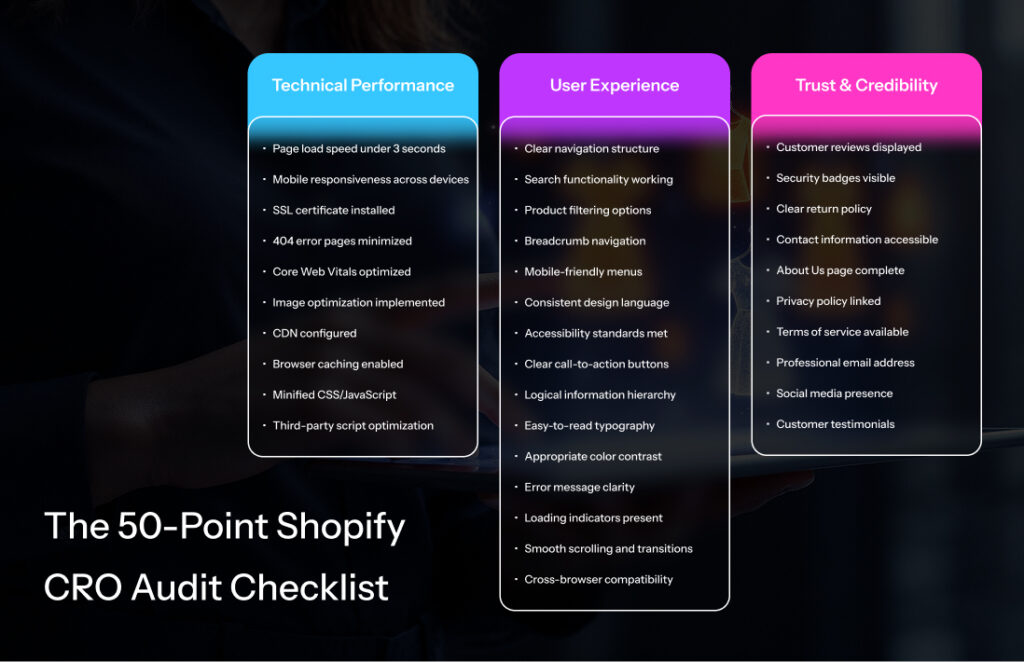
Now you possess the full strategic roadmap, encompassing everything from simple assessments to in-depth psychological enhancement for large companies.
That being said, a strategy without suitable resources is like a plan without the means to execute it. The crucial distinction between flourishing businesses and those that encounter difficulties doesn’t lie in the knowledge itself, but in utilizing the appropriate tools within the allocated budget. Below is a list of the comprehensive toolkit you will need.
Tools & Resources
Free Tools
Analytics & Tracking:
- Google Analytics 4: Advanced ecommerce tracking
- Google Search Console: Technical SEO monitoring
- Hotjar Free: 35 sessions/day heatmaps
- Shopify Analytics: Built-in conversion tracking
Testing & Optimization:
- Google Optimize: A/B testing (being sunset, use alternatives)
- Shopify Theme Inspector: Performance debugging
- PageSpeed Insights: Speed optimization
- Mobile-Friendly Test: Mobile usability
Paid Tools
Comprehensive Analytics:
- Hotjar Pro ($99/month): Unlimited heatmaps, recordings, surveys
- Crazy Egg ($29/month): Advanced heatmaps and user recordings
- Lucky Orange ($10/month): Real-time visitor tracking
A/B Testing:
- VWO ($199/month): Full-stack testing platform
- Optimizely ($50/month): Advanced experimentation
- Convert ($99/month): Privacy-focused testing
Advanced Analytics:
- Amplitude ($995/month): Product analytics and cohort analysis
- Mixpanel ($833/month): Advanced event tracking
- Heap ($3,600/month): Automatic event capture
Conversion Optimization:
- Unbounce ($90/month): Landing page optimization
- Instapage ($199/month): Personalized landing pages
- Dynamic Yield ($1,000/month): AI-powered personalization
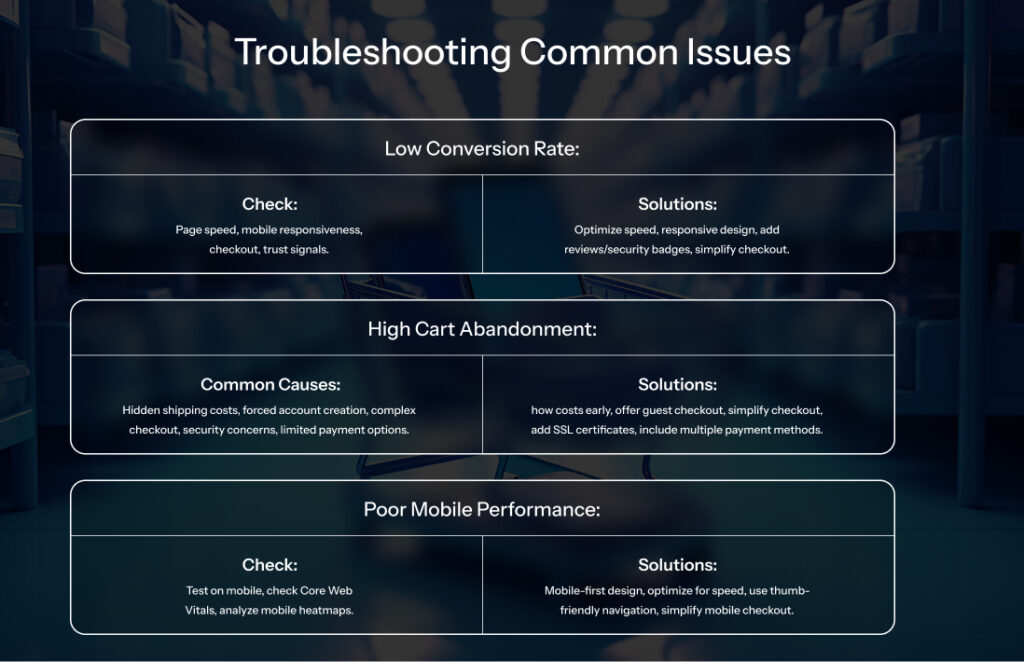
What’s Next? Your Shopify CRO Journey Starts Now
Now that you have it, you now have the complete framework that’s helped Shopify stores increase their conversion rates. But here’s the thing about knowledge: it’s only valuable when you act on it
Your customers are waiting. Your conversion rates are waiting. Your success is waiting.
The only question is: Are you ready to claim it?

 By
By
 By
By