With rapid advancement in technology AWS Cloud, businesses around the globe are learning how important resilience is in their applications. Resilient applications not only survive under pressure but thrive. They are developed for scaling up with growing user bases, absorbing variable load from fluctuating demand, and ensuring secure, high-performance experiences. Where digital transformation remains the top priority for enterprise establishments in most industries today, that kind of resilience has never been more important.
That is where AWS comes in. AWS’s cloud platform offers great scalability, resiliency, and flexibility for applications ranging from local community tools to global platforms. No matter the scale, AWS can help your infrastructure expand smoothly.
In this blog, we will see how to design a highly scalable and resilient application architecture on AWS Cloud. We will take you through every step of growth, from a few hundred users to millions, helping you make smart decisions along the way. Let’s get started.
Why AWS Cloud Is the Best for Scaling
AWS Cloud is a cloud leader, providing businesses with a comprehensive suite of services to help scale their applications efficiently. Here’s why AWS is the go-to choice for scaling applications:
- Global reach: With AWS’s global network of data centers, you can serve users all around the world thus minimizing latency and providing high availability.
- Elasticity: The AWS cloud is designed to scale in and out automatically. You can scale up resources such as the number of EC2 instances whenever demand increases; later, during quieter periods, AWS does the scaling down to help you save costs.
- Pay-As-You-Go Pricing: AWS’s pricing model allows you to start small and only pay for what you use. As you scale, you can avoid upfront infrastructure costs, ensuring you’re never over-provisioning.
- Comprehensive Service Suite: AWS Cloud offers everything you need—from computing and storage services to security and analytics. It provides tools for managing and monitoring your app at every stage of development.
- High Availability and Fault Tolerance: ELB-Auto Scaling provides fault tolerance and high availability from services such as Elastic Load Balancing and Auto Scaling. Others will keep functioning even if one instance goes down.
Scalability Strategy: Vertical vs. Horizontal
When building scalable systems, you have two main options: vertical scaling and horizontal scaling. It’s necessary to know when and how to use each strategy for establishing resilient architectures.
1. Vertical Scaling (Scale-Up):
Vertical scaling increases the resources that a single server provides, memory, and storage. It is the cheapest way of scaling your application, but it is limited too. You can only scale a single server so much until it reaches its physical limits.
- When to use it: When your application has low traffic, or it is a short-term need.
- Limitations: Vertical scaling can get quite expensive, and it does not offer the same redundancy and availability as horizontal scaling.
2. Horizontal Scaling (Scale-Out):
Horizontal scaling involves adding more servers to distribute the load across multiple instances. It is the method used by large-scale applications in preference because it can be scaled almost infinitely.
- When to use it: Horizontal scaling is very good at tolerating unknown peaks in traffic. It also offers better availability as the load is spread across several instances.
- Benefits: Scalability and fault tolerance are significantly enhanced by using horizontal scaling.
While both strategies have their place, horizontal scaling is typically the more effective choice for apps expecting rapid growth and heavy traffic.

Horizontal scaling vs Vertical scaling
AWS Cloud Scaling Life Cycle: A Step-by-Step Explanation
Now that we’ve covered these strategies, let’s break down how to scale your app on AWS Cloud at different stages of growth. We will walk through each stage, from early-stage development, through to scaling to millions of users.
PHASE 1: Early Development (1-10 Users)
It is at the early development stage that you test the application with a modest audience. The idea is to retain as low a cost as possible while ensuring your infrastructure remains feasible for testing and primitive feedback.
- Compute Resources: Start with a single Amazon EC2 instance or AWS Lightsail, keeping things simple and cheap. These services are very well-suited to smaller apps, offering a reliable yet low-cost way to handle traffic.
- Storage: You can use Amazon S3 to store static content, for example, images and videos. Amazon S3 is extremely durable and very easy to scale, so you can store and serve content without any concern about capacity.
- Monitoring: Even at this stage, monitoring plays a crucial role. AWS Cloud Watch gives you insights into the performance of your application, enabling you to track and set usage patterns so that issues can be discovered early.

Diagram illustrating a basic setup with an EC2 instance, RDS database instance, and CloudWatch for monitoring
For instance, a health-tech startup can leverage the use of Amazon EC2 for basic app hosting and Amazon S3 for storing patient data, images, and other media.
PHASE 2: Launch Preparations (10-100 Users)
As you approach an official launch, you’ll need to start building out your infrastructure to handle more users and increased traffic.
- Load Balancing: In this, use Elastic Load Balancing to distribute incoming traffic across multiple EC2 instances so that no single server becomes overwhelmed.
- Auto Scaling: The AWS Auto Scaling automatically adjusts the number of running instances based on traffic, ensuring you don’t overpay for unused resources while maintaining availability in case of peak periods.
- Database Services: Use relational database service, Amazon RDS, for relational database management. It supports easy scalability and automated backups, patching, and monitoring.
- Caching: Use Amazon ElastiCache for Redis or Memcached to cache frequently accessed data, like a user’s profile or product catalog. It will dramatically improve response times.
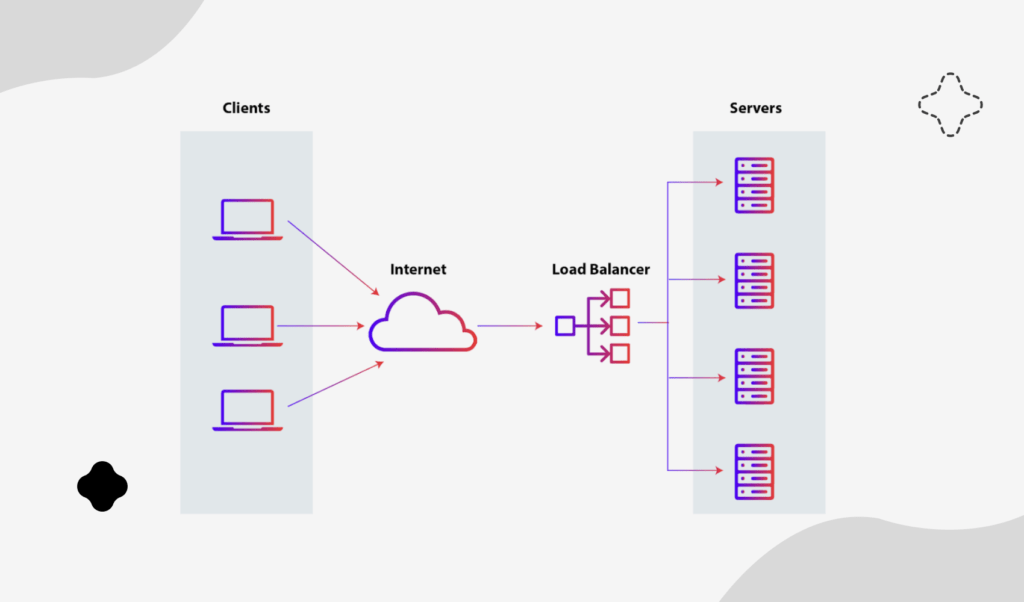
Illustration of load balancing in application architecture
Example: For example, a fitness app, uses RDS for storing user data and ElastiCache to store user preferences by letting the application run faster and be much more responsive for users.
PHASE 3: Steady Growth (100-1,000 Users)
As your app begins to gain momentum, your infrastructure must be optimized for higher reliability, scalability, and performance.
- Containerization: Consider Amazon ECS (Elastic Container Service) or Amazon EKS (Elastic Kubernetes Service) for serverless functions. Containers allow your app to split up into microservices, which makes your application more flexible and scalable.
- Database Scaling: You are going to want to leverage read replicas in Amazon RDS to take on more read traffic and distribute that across many database instances.
- Global Content Delivery: Cache static content like images, video, and web pages using Amazon CloudFront and deliver it to users across the globe, with improved response times and lower latency.
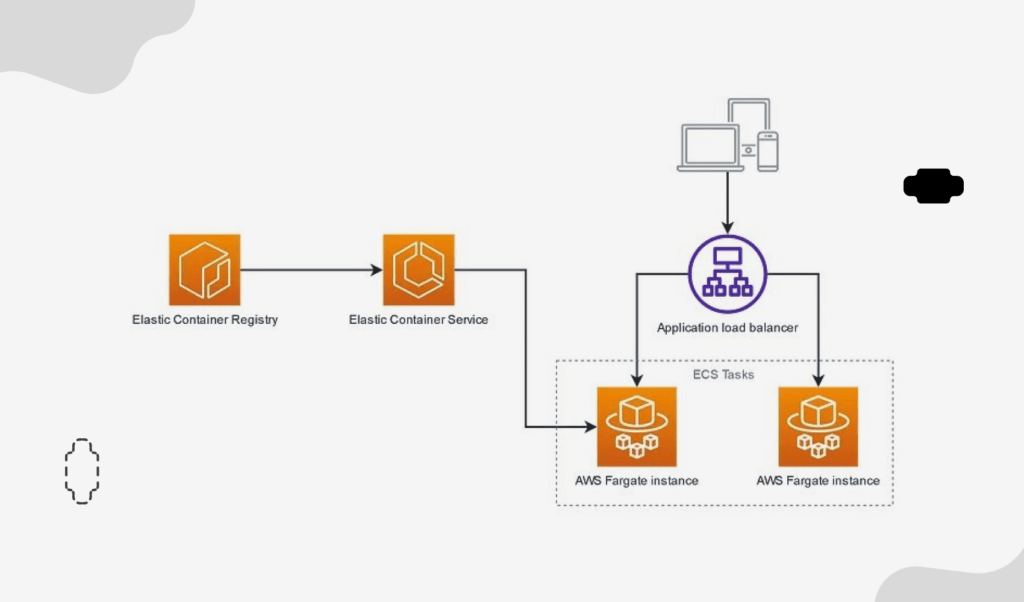
Illustration of a containerized microservices architecture with ECS
For example, a video streaming service can use CloudFront for video content distribution and Amazon RDS for user data management.
PHASE 4: Scale for Thousands (1,000-10,000 Users)
By this time, your app has to be resilient, secure, and highly available.
- Multi-AZ Deployment: Distribute your app across multiple Availability Zones (AZs) within a region to ensure high availability. This setup provides fault tolerance, ensuring that your app remains up even if one AZ experiences issues.
- Cross-Region Replication: For global apps, consider using AWS Global Tables or Aurora Global Databases for cross-region replication, ensuring low-latency access to data no matter where users are located.
- Scalability: Use Route 53 for DNS service, reduce latency, improve cache hits by spreading traffic across multiple regions and locations
- Advanced Security: Implement AWS WAF and Shield for DDoS protection, and guard your app against malicious traffic.
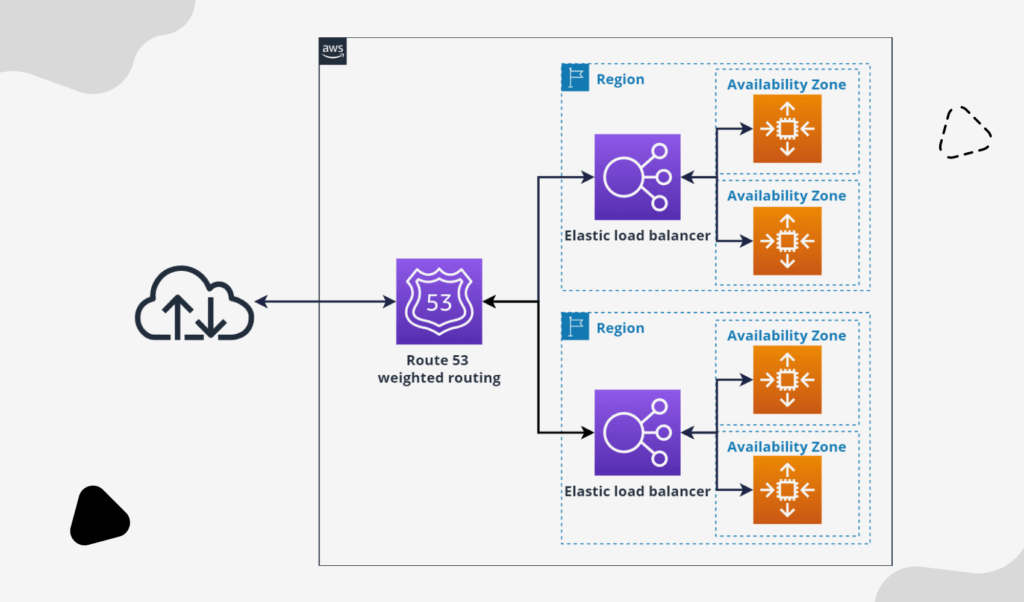
The visual of a multi-AZ (Availability Zone) deployment
Example: An online learning platform can use multi-AZ infrastructure so that students can access course content even when it is really busy.
PHASE 5: Enterprise-Level Scaling (10,000 to 100,000 Users)
As you approach enterprise-level traffic, your app’s infrastructure should support automation, microservices, and continuous monitoring.
- Microservices Architecture: Break down your app into microservices with AWS Fargate for serverless containers. This allows each service to scale independently based on its own requirements.
- CI/CD Pipeline: Automate your entire process of deploying through AWS CodePipeline and CodeDeploy. This ensures that your app can be updated seamlessly without downtime.
- Centralized Monitoring: It uses AWS Cloud Trail, GuardDuty, and CloudWatch for full-fledged security monitoring, allowing you to identify potential threats and issues in real time.
Diagram showcasing the microservices architecture of an application
Example: A multinational retailer could use microservices to split up user registration, order processing, and inventory management as distinct services so that each service can be scaled independently.
PHASE 6: Scaling to Millions (100,000–1 Million+ Users)
When your app is handling millions of users, the architecture needs to be optimized for low latency, high availability, and seamless data replication.
- Global Database Solutions: Use DynamoDB Global Tables or Aurora Global Databases for low-latency access to data globally. This ensures that data is always available to the users regardless of their location.
- Traffic Management: Use AWS Global Accelerator to optimize routing and route traffic to the nearest available endpoint, thereby minimizing latency for end-users anywhere in the world.
- Advanced Security and Compliance: Centralized security management using AWS Cloud Security Hub and the use of AWS IAM (Identity and Access Management) policies to add layers of access controls in your application.
Example: A social networking website with millions of users can use Global Accelerator to reduce latency and DynamoDB to store data in multiple regions.
Scaling Challenges and Solutions on AWS Cloud
Scaling applications on AWS presents tremendous potential, but enterprises often face some specific challenges along the way. Here are some common scaling challenges on AWS Cloud followed by some practical solutions for each.
1. Cost Management
Scaling on AWS can become very expensive with growing resource requirements. It is challenging to keep control over expenses without proper oversight, which affects the overall ROI.
Solution:
- Optimize Resource Utilization: Use AWS Auto Scaling to automatically adjust resources in response to real-time demand, reducing unnecessary costs by scaling down when usage is low.
- Cost Analysis and Billing: Leverage AWS Cost Explorer to analyze usage trends and set up AWS Budgets to stay within predefined cost limits. For non-essential workloads, consider using EC2 Spot Instances to further reduce expenses.
2. Data Management
As the volume of data grows, ensuring consistency and redundancy across regions can become complex, especially in applications that rely on real-time data.
Solution:
- Automated Backups and Replication: Amazon RDS’s automated backups and cross-region replication provide data redundancy and disaster recovery options, making data management smoother and more secure.
- Data Partitioning: Using the partitioning features in DynamoDB breaks a large dataset into fragments improving data retrieval times and scalability.
3. Security and Compliance
With growth comes increased attention to data security and regulatory compliance, especially when handling sensitive information.
Solution:
- Better Access Control: Activation of Multi-Factor Authentication on all users attempting to log into the AWS Management Console. This adds a layer of security beyond passwords.
- Compliance Frameworks: AWS has established many compliance certifications, including HIPAA, GDPR, and SOC 2, which enables firms to easily meet their regulatory compliance burden rather than having to establish them in-house from ground zero.
4. Operational Complexity
The management of highly scaled-out applications across multiple AWS services and microservices can be very operationally intense and demand more dedicated expertise and resources.
Solution:
- Infrastructure as Code (IaC): AWS CloudFormation lets you define infrastructure configurations in code, which minimizes the chance of human error while improving consistency and scalability.
- Monitoring and Auditing: AWS CloudWatch monitors applications, AWS Cloud Trail logs activities for auditing, and AWS X-Ray enables the tracing of distributed applications and makes management and optimization of complex architectures much easier.
Conclusion: Scaling for the Next Million Users
As we’ve seen throughout this guide, scaling an application from a handful of users to millions is a gradual process. With AWS, you can leverage a range of services to ensure your infrastructure evolves to meet the growing demands of your users. From the early days of development to the massive infrastructure required to handle global traffic, AWS provides the tools needed to build scalable, resilient applications. By using a combination of elasticity, automation, and smart architecture choices, your application can thrive at any scale.
Are you ready to scale your application with AWS? The next billion users are waiting!

 By
By
 By
By